




Description
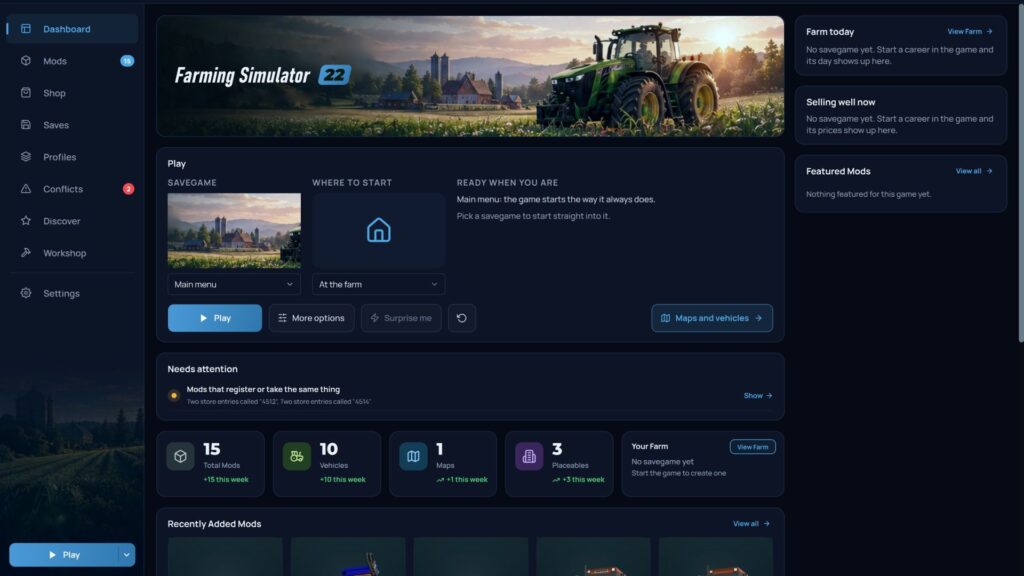
#gallery-1 { margin: auto; } #gallery-1 .gallery-item { float: left; margin-top: 10px; text-align: center; width: 20%; } #gallery-1 img { border: 2px solid #cfcfcf; } #gallery-1 .gallery-caption { margin-left: 0; } /* see gallery_shortcode() in wp-includes/media.php */ Your farm, your mods and your savegames in one window, so you spend less time sorting folders and more time farming. 🗺️ See your farm on an interactive map Open any savegame and see your farm from above: fields with what’s growing on them, every vehicle you own with its load and wear, your buildings, bales, even the collectibles you haven’t found yet. Zoom in, search, click anything for details. 🚜 Start exactly where you want Pick a save, then choose where to begin: in the farmyard, behind the wheel of any of your vehicles, or on foot at any point on the map. One click, and the game loads right there. Not sure what to do today? “Surprise me” picks for you. 🌾 Your farm today The dashboard shows the day on your newest save: date, weather and forecast, active contracts, animals, what’s in storage, and which goods are worth holding until the price goes up. ✏️ Edit your career, safely Change money and loans, farm names, game rules, time and weather. In the vehicle editor you can repair, wash, refill or sell any machine. Everything is edited while the game is closed, and nothing is touched without a backup. 📦 Every mod, explained Each mod gets its own page with the full description, everything it adds to the shop (with pictures) and the keys it binds. Browse your whole modded shop sorted by price, power, working width or capacity, and look at any tractor or building in 3D. 🛡️ Problems caught before you press Play Missing mods for a save, mods that clash, broken archives, mods the game won’t load: all listed with a one-click fix. After a session, the game’s log is read for you and each error is pointed at the mod that caused it. 🎮 Profiles for every playstyle Keep a mod set for each map, for multiplayer with friends, or for testing, and switch between them in a click. 💾 Backups that have your back Back up your mods and savegames, and undo changes from restore points. Updated a mod and regret it? The previous version is still there. For mod makers: a release check that catches broken modDesc entries, missing files and XML errors, plus shop icons rendered straight from your 3D model. Also works with FS25, FS19, BeamNG.drive, Euro Truck Simulator 2, American Truck Simulator and The Sims 4. Changelog: + AVA Mod Manager 0.9.6 NEW: Mod Sync – play together without hunting for mods Want to play your savegame with friends? They no longer have to find and download every mod one by one. – Open your savegame on the Saves page and share its mods. You get a session key (like K7MX-4RPQ) immediately, while the files are still uploading, so friends can start right away. – Your friend enters the key, sees which mods they are missing and presses Download. – They choose where the mods go: a new profile named after your savegame (the default), one of their own profiles, or the whole mods folder. The manager downloads the mods, installs them and switches that profile on. – Then they press Play and join your game. – A mod they already have but the game would not load (outside the active profile, or switched off) is switched on instead of being downloaded again. – Closed the window? The key stays. Open it again for the same savegame and you get the same session, with “Upload the rest” if something did not finish. “Close the session” ends it and deletes the files. – Files go through AVA’s own storage and are checked on arrival. If a file is too big for the session, the window names it and uploads the rest anyway, starting with the map. – Works for FS25, FS22 and FS19. You need a connected ModsFire account. Profiles always match the game – The active profile is rebuilt every time the mods are read: when the section opens, on Rescan (F5), and after a mod is installed or deleted. Before, only the Play button did this, so starting the game from Steam could load a mod you had deleted, and neither Rescan nor restarting the manager helped. – Fixed: a profile starting with mods it never contained, and the game asking for mods (“X requires Y”) that were not even installed. Leftovers from older versions are cleaned up the first time you open the section. – Play on the Profiles page now asks which profile to start instead of quietly starting the last active one. – Missing dependencies are listed before the game starts, all at once, instead of the game reporting them one at a time. – A mod downloaded by the game’s own ModHub while a profile was active is moved to your mods folder instead of being lost. – “Add to profile” adds all checked mods in one go. Mods page – Duplicates are detected the way they actually end up on your PC: FS25_JohnDeere8R, JohnDeere8R_v1.0 and “FS25_John_Deere_8R (1)” are one mod, and so are a -main download from GitHub, an FS22_ copy next to the FS25_ one, and a copy you renamed yourself. Model numbers are respected: John Deere 7810 and 7820 are not duplicates. – New Sort button for the list and the cards: name, newest or oldest first by date added, author, version, size, enabled first. It remembers your choice. – “View all” under Recently Added Mods opens all your mods, newest first. Check the new ones (click, then Shift+click) and put them into a profile in one go. – “7 selected” over three cards now tells you how many are hidden by the filters, and “Show them” brings them all back into view. Safer with your files – Before this release, everything that writes, moves or deletes your files was reviewed again. Fixed: mods not coming back when leaving a profile, a half-copied file being taken for a real mod, and restore points failing on a new PC or with very long paths. – Deleted mods go to the Recycle Bin. If Windows refuses, the file stays and the manager tells you why. Also – Works on small screens: on a 1280×720 laptop at 150% scaling nothing overlaps anymore. – One-click install from ModsFire works with spaces and non-Latin letters in the file name. – Everything is translated into Russian, Ukrainian, French, German, Spanish and Portuguese. – For truckers: Euro Truck Simulator 2 and American Truck Simulator now have a section of their own. Credits: AVAManager Download mod File File size AVAModManager-v0.9.6-setup 50 MB
Specifications
- Game
- Farming Simulator 22
- Category
- Постройки и объекты
- Version
- 0.9.6
- Size
- 49.68 MB
- Published
- 10.11.2026
- Views
- 1
Attribution
- Source
- https://fs22.com/farming-simulator-22-mods/scripts-and-tools/ava-mod-manager-v0-9-5-2/
- Author
- doviz
- Imported
- 2026-11-10 12:37
Similar mods
More mods for Farming Simulator 22 — matched by category, tags and popularity
Comments
0No comments yet — be the first.